My Google Tag Assistant is not working with Partytown
Learn how to debug GTM and GA when Partytown is enabled and how to handle common jQuery-related errors.
Keywords: Partytown | Google Tag Manager | Google Analytics | Tag Assistant | jQuery
These troubleshooting steps are specific to FastStore projects.
Partytown improves website performance by offloading third-party script execution to a web worker. However, this can introduce challenges when debugging analytics tools like Google Tag Manager (GTM) and Google Analytics (GA) or when scripts have specific dependencies. This article provides solutions for common issues, such as Google Tag Assistant not working and "jQuery is not defined" errors.
Solutions
Debug Google Tag Manager and Google Analytics
Google Tag Assistant can't debug GTM and GA tags when Partytown is enabled. To debug your tags and GA behavior, make GTM run outside Partytown during the debugging session.
- Append
?gtm_debug=to your URL. This query string ensures that GTM scripts and all injected tags run outside Partytown, allowing Tag Assistant to work. This behavior persists during Single Page Application (SPA) navigation but not when navigating through absolute links or full page reloads. - When previewing a GTM container, configure it to automatically include the
gtm_debug=query string in the URL.
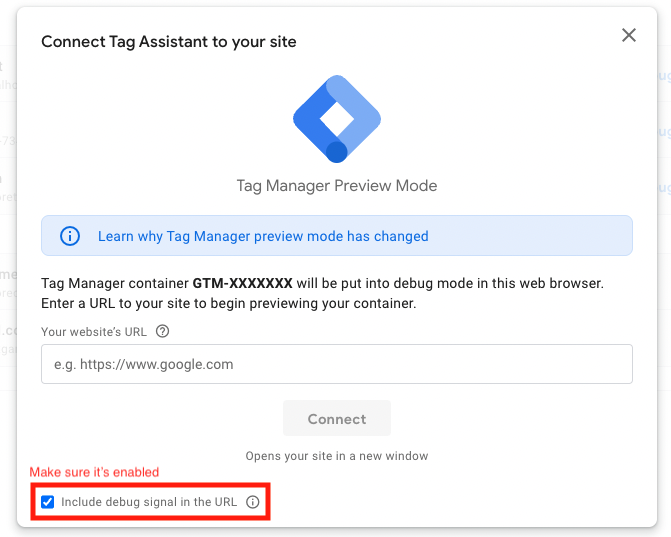
- If you use Google Analytics 4 (GA4), debug events directly in Google Analytics. Check the official Google documentation for instructions.
See events pushed to dataLayer
When Partytown is enabled, you can't read the dataLayer variable directly from the browser console. To monitor events pushed to dataLayer, inject a custom script.
-
Open the browser developer console.
-
Execute the following JavaScript snippet:
_10window.dataLayerHistory = []_10const originalPush = dataLayer.push_10dataLayer.push = (data) => {_10console.log(data)_10dataLayerHistory.push(data)_10originalPush(data)_10} -
After running the script, every event added to
dataLayeris logged in the browser console. All events are also stored in thewindow.dataLayerHistoryvariable for review. This continues to work across Single Page Application (SPA) navigation.
Resolve "jQuery is not defined" or "$ is not defined" errors
If scripts running in Partytown encounter "jQuery is not defined" or "$ is not defined" errors, Partytown can't access jQuery from the web worker environment. After identifying the script causing the jQuery-related error, you can try the solutions below:
- Remove jQuery dependency (recommended): The most robust solution is to refactor your script to use vanilla JavaScript instead of relying on jQuery. This eliminates the dependency and ensures compatibility across different environments.
- Break down the script: If a full refactor isn't immediately possible, identify the parts of your script that don't depend on jQuery and make sure they run as expected. Then, address the jQuery-dependent parts separately using other solutions.
- Define jQuery locally in the script: In the problematic script, add the line
$ = jQuery = window.jQuery. This explicitly defines these variables locally within the script scope, which may allow Partytown to recognize and use jQuery from the web worker.