Secure Proxy
Learn how Secure Proxy allows payment connectors hosted in non-PCI environments to transfer sensitive card data securely.
Secure Proxy is a solution that allows payment integrations to transfer sensitive data (such as credit card numbers) in a secure environment. An integration must use Secure Proxy if it meets the following conditions:
- It uses credit, debit, or co-branded cards as payment methods.
- The environment where the connector is hosted doesn't have an Attestation of Compliance (AOC) for PCI DSS (Payment Card Industry Data Security Standard).
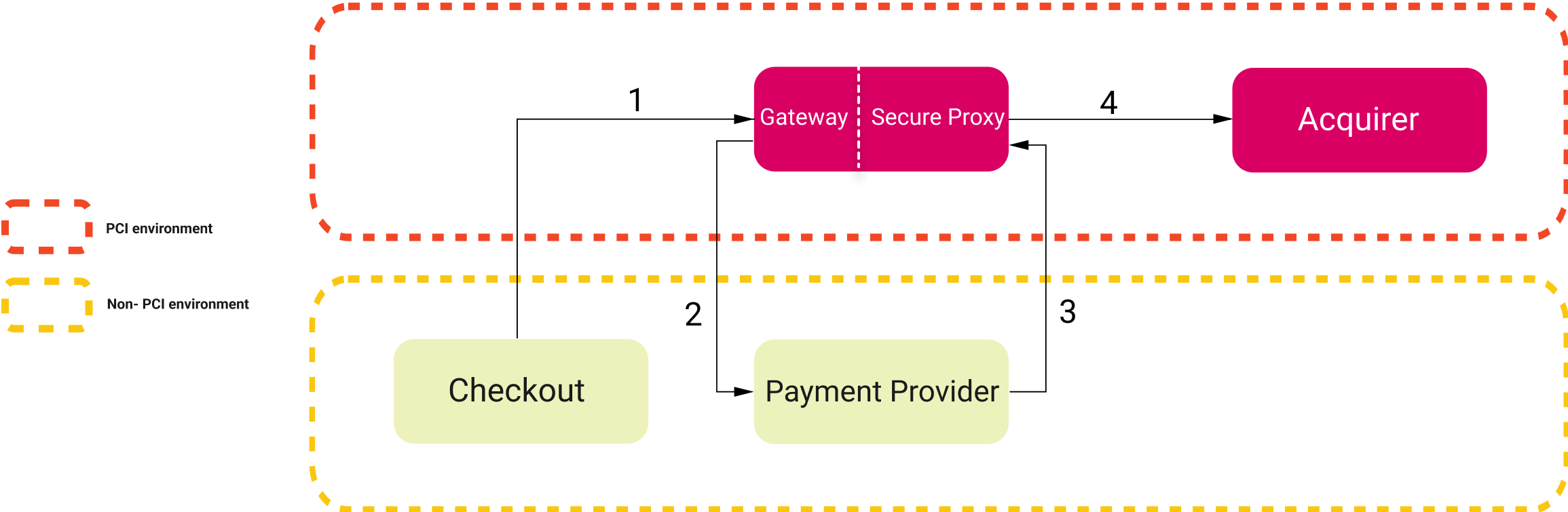
When an integration is PCI compliant, it doesn't need to use Secure Proxy and is allowed to receive sensitive data and communicate directly with the acquirer. When using Secure Proxy, the following changes occur in the flow of the integration:
-
The Authorization request works as usual.
-
The provider receives tokens from VTEX’s Payments Gateway that refer to the sensitive data, instead of the actual data.
-
The provider sends the acquirer’s API endpoint and the merchant credentials to the Gateway.
-
The Gateway makes the API call to the acquirer, acting as a proxy between the provider and the acquirer. In this call, the tokens are replaced by sensitive data.
PCI DSS at VTEX
PCI DSS is an international standard for how companies must process card information. Among the many rules of this standard is an important one stating that card information must be transferred over a secure infrastructure audited by a Qualified Security Assessor (QSA) company qualified by the PCI Security Standards Council.
VTEX’s Payments Gateway service is certified by this entity to process sensitive card information, and such information can only be transferred in a secure environment where services and partners have an AOC signed by a QSA company. Security measures needed to meet the PCI DSS requirements include, but aren't limited to, using a firewall, encrypting the transmission of cardholder data, keeping antivirus software updated, restricting access to cardholder data with authentication, and monitoring all access to network resources. For more information about PCI DSS requirements, including the current version of the Quick Reference Guide, see the PCI DSS standard page.
Reasons to use Secure Proxy
Not all of VTEX’s payment ecosystem (partners and clients) have PCI DSS certification, which is required for our Payments Gateway to send card information. Besides, the VTEX IO platform is a development environment designed to accelerate the creation of new solutions for our ecosystem, and we want to enable it to create payment solutions as well.
Given that the integration environment is fundamental for a transaction to take place under business rules governing how a payment should be processed, a solution is needed to address scenarios in which the integration environment isn't PCI certified. Therefore, Secure Proxy comes as a solution to enable new integration scenarios with VTEX’s payment partner ecosystem.
Through this solution, the Payments Gateway acts as a communication service between a payment provider in a non-PCI environment and an acquirer. The Payments Gateway sends tokenized card information to the payment provider without the risk of compromising data security. The tokens are used to replace sensitive information in the provider and to act as a reference to the information in the Gateway.
When a system doesn't meet all the security requirements, it might be vulnerable to attacks and data theft. This can lead to serious consequences, including fraud losses, loss of customer confidence, reduced sales, legal costs, and fines. For more information about these security issues, see the PCI Security Standards Council resources for merchants. By meeting PCI DSS requirements, those issues and their consequences can be avoided.
Secure Proxy is mandatory for connectors built with the VTEX IO infrastructure since it isn't compliant with PCI DSS. This also includes connectors made through our Payment Provider Framework.
How it works
This section details how the solution works in a payment authorization flow. The following image shows an overview of the flow, including the Secure Proxy and the four steps required for the acquirer to authorize the payment.
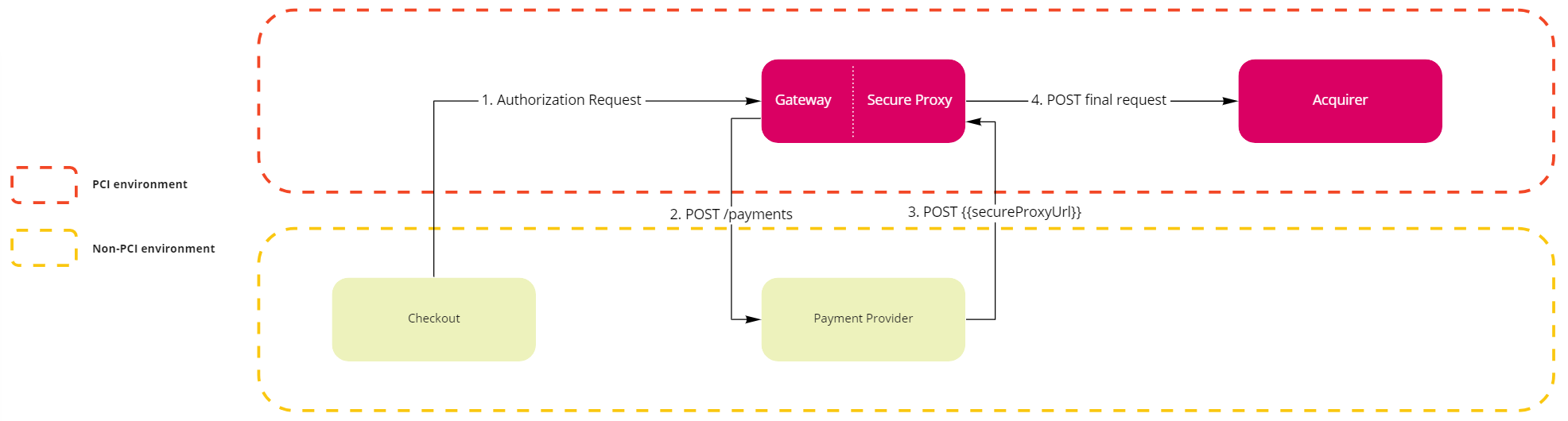
1. Checkout submits a payment authorization request to the Gateway
There is no change to the current flow. The Checkout makes an Authorize new transaction request to the Gateway.
2. Gateway requests the provider to create a new payment using tokens
The Gateway makes a Create payment request to the provider. The provider receives all the payment requests from the Gateway (creation, authorization, capture, and cancellation), whether or not it uses the Secure Proxy, and uses the settings defined in the integration, such as the maximum time to cancel a transaction and the supported payment methods.
The following example shows a payment creation request using a non-PCI payment provider. In this solution, the secureProxyUrl field specifies the API endpoint that the payment provider must call when communicating with the acquirer. In addition, all sensitive card information has been tokenized by the Gateway.
Request body
_16{_16 ...,_16 "secureProxyUrl": "https://account.vtexpayments.com.br/.../proxy",_16 "card": {_16 "holderToken": "#vtex#token#d799bae#holder#",_16 "bin": "555544",_16 "numberToken": "#vtex#token#d799bae#number#",_16 "numberLength": 16,_16 "cscToken": "#vtex#token#d799bae#csc#",_16 "cscLength": 3,_16 "expiration": {_16 "month": "02",_16 "year": "2028"_16 }_16 }_16}
For the response body of this request, see the Create payment endpoint reference.
3. Provider calls the Gateway to use the Secure Proxy
The provider makes a POST https://account.vtexpayments.com.br/.../proxy call to the Gateway. This is the endpoint provided in the secureProxyUrl field. This step occurs as follows:
- The payment provider creates the object to be sent to the acquirer, using the tokenized data submitted by the Gateway in the corresponding fields. To have the request forwarded to the acquirer, the provider sets the
X-PROVIDER-Forward-Toheader to the target URL. The Gateway then does the following:- Verifies if the URL is in the list of PCI-certified URLs.
- Replaces the tokens placed in the card fields.
- Submits the request to the acquirer.
- To submit custom headers to the acquirer, the provider adds the
X-PROVIDER-Forward-prefix to each one, for example,X-PROVIDER-Forward-MerchantId. The Gateway removes the prefix and submits the headers. - The response body is forwarded from the external gateway or acquirer to the payment provider.
Possible response errors
The possible known errors are:
- Error 400: The submission URL isn't specified in the header.
- Error 400: The integration transfers data not recognized by the Payments Gateway in the tokenized fields (
holderToken,numberToken,cscToken). - Error 403: The submission URL of the request isn't allowed.
- Error 500: The Gateway can't respond due to an internal failure.
The external gateway or acquirer can also respond with their own 4xx or 5xx errors.
You must open a ticket with VTEX Support requesting that the acquirer’s endpoint (the one used in the
X-PROVIDER-Forward-Toheader) be added to VTEX’s allowed list of endpoints, along with the AOC of the acquirer. If a request is made to the acquirer’s endpoint and it isn't on the allowed list, the request results in an error.
Request header
_10Accept: application/json_10Content-Type: application/json_10User-Agent: HttpClient-1.0_10X-PROVIDER-Forward-To: https://apisandbox.acquirer.com/v2/sales/_10X-PROVIDER-Forward-MerchantId: xxxxxxxx-xxxx-xxxx-xxxx-xxxxxxxxxxxx_10X-PROVIDER-Forward-MerchantKey: 012345678901234567890123456789012345678
Requests to the Secure Proxy only accept two options for
Content-Type:application/jsonorapplication/x-www-form-urlencoded. OtherContent-Typeoptions aren't supported. If your integration needs a different one, share your use case with the product team by opening a ticket with the VTEX support team.
Request body
_15{_15 "MerchantOrderId": "123456789",_15 "Customer": { ... },_15 "Payment": {_15 ...,_15 "CreditCard": {_15 "Holder": "#vtex#token#d799bae#holder#",_15 "CardNumber": "#vtex#token#d799bae#number#",_15 "ExpirationDate": "02/2028",_15 "SecurityCode": "#vtex#token#d799bae#csc#",_15 ..._15 },_15 "Credentials": { ... }_15 }_15}
Secure Proxy only supports HTTP API (REST) integrations, which means it doesn't support web services (SOAP) or any other type of communication protocol.
4. Requests for external gateways or acquirers in a PCI environment
An example request that the Gateway submits to the acquirer: POST https://apisandbox.acquirer.com/v2/sales/.
Request header
_10Accept: application/json_10Content-Type: application/json_10User-Agent: HttpClient-1.0_10MerchantId: xxxxxxxx-xxxx-xxxx-xxxx-xxxxxxxxxxxx_10MerchantKey: 012345678901234567890123456789012345678
The request includes the following default headers:
AcceptContent-TypeUser-Agent
It also includes the custom headers sent by the provider, with the X-PROVIDER-Forward- prefix removed:
MerchantIdMerchantKey
Request body
_15{_15 "MerchantOrderId": "123456789",_15 "Customer": { ... },_15 "Payment": {_15 ...,_15 "CreditCard": {_15 "Holder": "JOHN DOE",_15 "CardNumber": "5555444433331111",_15 "ExpirationDate": "02/2028",_15 "SecurityCode": "123",_15 ..._15 },_15 "Credentials": { ... }_15 }_15}
This request has a timeout of 15 seconds. This means the Gateway waits 15 seconds for the acquirer’s response before responding to the payment provider.
Custom tokens
As shown in the preceding examples, card fields are the most often used tokens. However, the Secure Proxy also supports creating and using custom tokens. This is done via the secureProxyTokensURL field, which the Gateway includes in the request body of the Create payment request to the payment provider. The field contains the path to the endpoint that handles custom tokens.
In the following examples, the secureProxyTokensURL field has the value https://{accountName}.vtexpayments.com.br/payment-provider/transactions/{transactionId}/payments/{paymentId}/tokens?hash={longSecureHash}.
Accessing tokens
To fetch the list of all tokens created for a payment, send a GET request to the secureProxyTokensURL. By default, the list only includes the immutable credit card information tokens (number, holder, and csc) created by the Gateway.
Response body
_16{_16 "tokens": [_16 {_16 "name": "number",_16 "placeholder": "#vtex#number#{secureHash}#"_16 },_16 {_16 "name": "holder",_16 "placeholder": "#vtex#holder#{secureHash}#"_16 },_16 {_16 "name": "csc",_16 "placeholder": "#vtex#csc#{secureHash}#"_16 }_16 ]_16}
The secureHash is a short string used to authenticate access to a specific payment within the Secure Proxy, such as d799bae, as shown in Gateway requests the provider to create a new payment using tokens.
Creating custom tokens
To create tokens, send a POST request to the secureProxyTokensURL. After you create them, you can reference these tokens inside requests to the Secure Proxy, and they are replaced with their values before the requests are forwarded to the acquirer.
Custom tokens allow, for example, the creation of tokens whose values are derived from credit card information.
The creation request must include a list of tokens to be created, each consisting of a name and a value. The name is included in the placeholder used to reference the token, and the value is a JsonLogic expression that describes it. In the value field for each token in the request body, every string must be encoded in the UTF-8 format.
Request body
_16{_16 "tokens": [_16 {_16 "name": "newToken",_16 "value": { "==": [1, 1] }_16 },_16 {_16 "name": "hashedCardNumber",_16 "value": {_16 "md5": {_16 "replaceTokens": ["#vtex#number#{secureHash}#"]_16 }_16 }_16 }_16 ]_16}
The preceding request creates two new tokens:
- The first token is created from a simple expression, and its value evaluates to
true. - The second token has an expression that uses custom Secure Proxy operators to compute the MD5 hash of the card number. This is done by detokenizing the card number token with the
replaceTokensoperator and then applying the MD5 operator to the result.
Response body
_12{_12 "tokens": [_12 {_12 "name": "newToken",_12 "placeholder": "#vtex#newToken#{secureHash}#"_12 },_12 {_12 "name": "hashedCardNumber",_12 "placeholder": "#vtex#hashedCardNumber#{secureHash}#"_12 }_12 ]_12}
The response is a list of the tokens created. The placeholder can then be used in requests to the Secure Proxy to reference the values specified by the token’s expression.
A
placeholdercan be referenced in the body or as a header in a request to the Secure Proxy.
Custom supported operators
Aside from the default JsonLogic operators, the Secure Proxy also supports the following operators:
replaceTokens: Given a string, replaces the tokens in it with their respective values.base64: Given a string, encodes it in Base64.hmac-sha256: Given two UTF-8 encoded string arguments, computes the HMAC-SHA256 hash, considering the first string argument as the key and the second as the data to be hashed. The result is Base64-encoded by default.- Optionally, a third parameter may be specified to select the desired output format. The available options are
"base64"(default) and"hex". - Optionally, a fourth parameter may be specified to select the key format. The available options are
"plainText"(default),"hex", and"base64".
- Optionally, a third parameter may be specified to select the desired output format. The available options are
- Other hashing operators:
md5,sha1,sha256,sha384,sha512.- Given a string, these operators compute the hash and return the hex digest.
- These operators also have a second optional parameter that allows you to choose between a hex digest output and a Base64 output. The parameter is case-insensitive and, if used, must be the string
"hex"or the string"base64". If the optional parameter isn't used, the default output is the hex digest.
The following example creates a token named example-signature with an hmac-sha256 hash as its value:
_15{_15 "tokens": [_15 {_15 "name": "example-signature",_15 "value": {_15 "hmac-sha256": [_15 "this-is-the-key-value",_15 "this-is-the-data-value",_15 "this-is-the-optional-parameter-output-format",_15 "this-is-the-optional-parameter-key-format"_15 ]_15 }_15 }_15 ]_15}
The following example creates a token named example-signature-2 with an MD5 hash as its value:
_13{_13 "tokens": [_13 {_13 "name": "example-signature-2",_13 "value": {_13 "md5": [_13 "this-is-the-data-value",_13 "this-is-the-optional-parameter-base64-or-hex-output"_13 ]_13 }_13 }_13 ]_13}
The following example creates a token named example-base64 with a Base64-encoded string as its value:
_12{_12 "tokens": [_12 {_12 "name": "example-base64",_12 "value": {_12 "base64": [_12 "string-to-be-encoded"_12 ]_12 }_12 }_12 ]_12}
Known issues
The cat operator from the JsonLogic library may misbehave when concatenating dates, changing the date format.